

There is no single best trading journal. The app that helps a futures scalper review 40 fills is the wrong tool for a swing trader who logs six options trades a week in a spreadsheet. Ranked “top 10 of 2026” lists hide that. They crown a winner, then describe nine more products that look interchangeable.
Use this page to pick on fit. First, five buying criteria that actually change outcomes: broker import, a review loop (not just a log), asset-class support, price versus how often you trade, and how long it takes to journal a session. Then Excel versus a dedicated app. Then seven options — six products plus a spreadsheet baseline — with prices as of September 2026. Vendor plans change; confirm on their sites before you pay.
If you need the definition — fields, journal versus broker statement — start with what a trading journal is. If the constraint is cost, the best free trading journal list covers free tiers in more depth. If you already have one rival in mind, skip the table and open a head-to-head comparison. This article stays the roundup: which journal is worth paying for, and when a spreadsheet is still enough. For the product pages by market, use the trading journal hub — then stocks, options, futures, forex, or crypto.
What makes the best trading journal (not a trophy)
A journal is “best” when you will actually fill it and reopen it. Your broker already stores fills. Investopedia’s trading journal overview is a useful reminder that the point is process, not a prettier P&L. The five checks below are how you tell a review system from a paid trade log.
Broker import and auto-sync
If you take more than a handful of trades a day, typing every fill is how journals die. Confirm your broker, not a marketing count of “250+ connections.” Ask three things: live auto-sync versus CSV/file import; whether options, futures, or forex come through as complete trades (spreads, expirations, commissions); and what happens when sync fails. Manual entry is fine for swing traders. It is a tax on day traders.
A review loop, not a trade log
A log answers “what happened.” A journal answers “which setup I should stop trading.” Look for tags or strategy labels you can filter, a way to mark trades as reviewed, and a weekly cadence you will keep. Charts without a review habit are decoration. For why the habit matters more than the vendor, see why every trader needs a trading journal.
Asset class support
Stocks and crypto are table stakes. Options traders need multi-leg spreads, not a single debit. Futures traders need contract specs and session times. Forex traders need lots, pips, and pair-level stats. If a product buries your market in a generic “other” field, you will stop logging the fields that matter.
Price versus how often you trade
A $50/month journal can be cheap if it saves an hour of CSV cleanup every week. It is expensive if you trade twice a week and never open the reports. Match the bill to frequency: spreadsheet or a real free plan while you are building the habit; paid import/sync when logging time is the bottleneck; specialist psychology or stats tools only after the habit exists.
Time to log a session (including mobile)
Count minutes, not features. If journaling takes longer than the session, you will skip it after a bad day — exactly when you needed it. Native iOS/Android apps help if you review on the commute. A desktop-only specialist is fine if you already sit at a desk for the post-market review.
Excel vs a dedicated trading journal app
A spreadsheet is still a legitimate best trading journal for some people. You already know Microsoft Excel or Google Sheets. You can add any column you want. There is no subscription, and you can export for taxes. Use a starter layout from the Excel trading journal template or the Google Sheets trading journal if you want structure without software.
Spreadsheets fail in three predictable ways. First, data entry drift: one week you type “ORB,” the next “opening range,” and your pivot tables lie. Second, no broker sync — every fill is a copy-paste. Third, no forced review: a tab of numbers does not walk you through unreviewed trades. Move to an app when any of these is true: you trade enough that logging is the chore; you need expectancy, profit factor, or setup stats without building them; you want notes, screenshots, and P&L in one place.
Best trading journal options compared (2026)
Prices below are approximate as of September 2026. Confirm current plans on each vendor’s pricing page. This is a fit table, not a ranked trophy list.
| Option | Best fit | Logging | Review strength | Typical price |
|---|---|---|---|---|
| TradeReview | Retail traders who want a review habit and a real free start | Manual on Free; CSV on Basic; auto-sync on Pro | Guided Review Sessions; tags and strategy follow-rate | Free; Basic $9.90/mo ($99/yr); Pro $19.90/mo ($199/yr) |
| Tradervue | Active discretionary traders, especially US stocks and futures | Import/sync; free tier capped by monthly trades | Reports and notes; long-running community of journal users | Free (limited); paid Silver/Gold around $30–$50/mo |
| TraderSync | Traders who want auto-import plus dense analytics | Strong import story (confirm your broker) | Dashboards and filters; less “walk each trade” | Paid from about $30/mo |
| TradeZella | Prop-firm and social-first traders who want a modern UI | Auto-sync advertised; reliability varies by broker | Analytics plus heavily marketed AI | No meaningful free tier; paid from about $35/mo |
| Edgewonk | Discretionary traders whose edge is psychology and process | Import-oriented, not mass auto-sync | Deep behavioral review (Tiltmeter-class) | About $169–$197 per year |
| TradesViz | Stats-oriented traders who want depth per dollar | Generous import; many broker connections advertised | Hundreds of stats; steep learning curve | Free Basic; paid from about $20/mo |
| Excel / Sheets | Low frequency, custom columns, $0 extra software | Manual | Whatever you build | $0 if you already have a spreadsheet |
Guided review with a real free plan
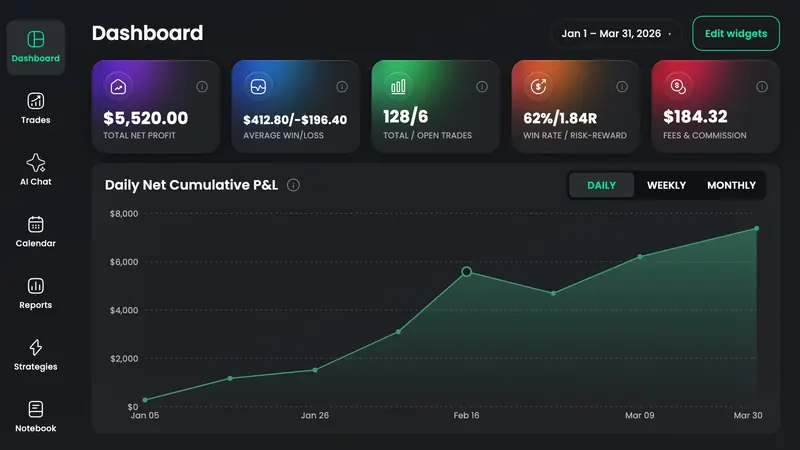
TradeReview is the option on this list built around a review loop first, then import. The Free plan is a working journal: one account, manual logging, Review Sessions, native iOS and Android, and a small AI Chat allowance scoped to your trades — not a 30-trade demo. Basic ($9.90/month or $99/year) adds CSV/file import, option spreads, and extra accounts. Pro ($19.90/month or $199/year) adds broker auto-sync. Check supported brokerages for which method your platform uses, and pricing for plan limits.
Pick this if you want to start without a card and upgrade only when typing fills becomes the bottleneck. Skip it if you need a prop-firm rule engine or Edgewonk-depth psychology tooling.
Tradervue
Tradervue is the veteran pick in most independent “best journal” roundups. The free plan is real but capped (30 grouped trades per calendar month — confirm). Silver and Gold add more trades, reports, and sharing. It is strongest for discretionary US stocks and futures traders who already live in a desktop review workflow.
Pick it if you want a proven importer and do not need native mobile as the primary surface. Skip it if you need a generous unlimited free tier or a modern mobile-first log. Head-to-head: Tradervue comparison.
TraderSync
TraderSync sells itself as auto-import plus analytics. Paid plans typically start near $30/month and step up for more reports and AI-style features. It is a reasonable “I will pay to stop copying CSVs” choice if your broker is on their list and you like dense dashboards.
Pick it if import reliability for your account is the buying criterion. Skip it if you only need a lightweight notebook or a true free plan.
TradeZella
TradeZella has the loudest 2025–2026 mindshare: prop-firm YouTube, modern UI, AI marketing. There is no meaningful free tier. Public pricing has sat around Essential ~$35, Pro ~$59, Ultra ~$99 per month — always confirm, because it changes. Recurring user complaints cluster on bugs, lag, and sync — the same areas the ads emphasize.
Pick it if you already want that ecosystem and will pay for it. Skip it if price, mobile, or a calm review habit is the priority. Searched “TradeZella alternatives”? Start at the compare hub, then the TradeZella head-to-head for the line-by-line. This section is only the fit note.
Edgewonk
Edgewonk is the psychology specialist. One annual plan (about $169–$197; promotions vary) unlocks the full toolkit. It is import-oriented rather than a mass auto-sync product, and there are no native iOS/Android apps — you work in the browser. That is a feature if your edge is behavior; it is a drawback if you wanted five-minute mobile logging.
Pick it if you already journal and need deeper process analytics. Skip it as your first journal. Head-to-head: Edgewonk comparison.
TradesViz
TradesViz competes on analytics per dollar: a forever Basic plan with a high execution cap (verify current limits), then Pro/Platinum around $20–$30/month. Marketing cites hundreds of stats and a large broker list. The tradeoff is complexity. If you only wanted a review session, the UI can feel like a statistics lab.
Pick it if you enjoy slicing data. Skip it if a simpler loop will get more use. Head-to-head: TradesViz comparison. More free-tier detail lives on the free journal roundup.
Excel or Google Sheets
Stay on a spreadsheet if you trade infrequently, already maintain clean tags, and do not want another login. Leave when copy-paste from the broker is the weekly chore, or when you cannot trust your own column names. Templates beat a blank grid; they still will not walk unreviewed trades for you.
How to choose a trading journal in 15 minutes
Work this list once. Do not demo seven products.
- Write down your broker and market. Options, futures, forex, and stocks are not the same import problem. If auto-sync is the reason you would pay, check that broker before you watch a feature video.
- Count last month’s trades. Under ~20: spreadsheet or a free plan. Daily and messy: paid import/sync.
- Name the review habit. Weekly 30 minutes with tagged setups is the job. If a product cannot filter by setup, it is a log.
- Cap the budget. $0 until the habit exists. Then pay for the bottleneck (import, mobile, or psychology) — not for a YouTube brand.
- Trial the logging, not the dashboard. Enter five real trades, including one messy options or futures fill. If that took longer than the session, pick something else.
Market-specific shortcuts: options — require multi-leg support before you pay. Futures — confirm contract and session handling, not just “futures” on a marketing page. Forex — check pip/lot math and pair reports. Day traders — optimize for sync speed. Swing traders — optimize for notes and a weekly review, not for 40-fill auto-import. Stocks and crypto landings: stock trading journal, crypto trading journal.
Frequently Asked Questions
What is the best trading journal app in 2026?
The best app is the one you will log in and review. For most retail traders that means: your broker imports cleanly, you can tag setups, and a weekly review is built in — not a 12-row trophy table. Use the criteria above, then shortlist two tools and test logging, not screenshots.
Is a spreadsheet still a good trading journal?
Yes, if your frequency is low and your columns stay consistent. Excel and Google Sheets are enough to calculate win rate and R once you record a stop on every trade. They are a poor best trading journal substitute once you are copying dozens of fills or never reopening the file.
Should I pay, or start free?
Start free (spreadsheet or a real free plan) until skipping reviews is no longer the problem. Pay when logging time or missing fields is the problem. “Free” journals that expire after 30 trades are trials, not free journals — that distinction is covered in the free trading journal guide.
What is the best trading journal for options, futures, or forex?
There is no universal winner per asset. For options, reject anything that cannot store a spread as one trade — see the options trading journal for how spreads, DTE, and expiration-month reports work in-product. For futures, verify contract specs and commissions survive import (futures trading journal). For forex, verify lots and pips (forex trading journal). Then apply the same five criteria; do not buy a stocks-first journal and hope.
How is this different from a broker statement?
A statement proves what filled. A journal adds plan, risk, rule-followed, and lesson — the fields you need to change behavior. If you only export fills, you have a log. Details and a worked example are in what is a trading journal.
What are the best TradeZella alternatives?
This article is the seven-option roundup, not a TradeZella-only list. If that is the query, start at compare trading journals and open TradeReview vs TradeZella for the 1:1. Edgewonk, TradesViz, Tradervue, TraderSync, and Excel stay in the table above as fit notes.
Bottom line
The best trading journal in 2026 is the one that matches your broker, your market, and a review habit you will keep. Use the five criteria, treat Excel as a valid baseline, and only then look at vendors. Do not start with a ranked list and work backwards. When you have one rival, use a head-to-head instead of re-reading this list.
When you are ready to log live trades in an app, open the journal and enter five real fills before you think about a paid plan. Pick a market landing if you already know the instrument: trading journals by market.
Related reading
- What is a trading journal — fields and a worked example
- Best free trading journal — forever vs capped vs trial
- Options trading journal — spreads, Call/Put, DTE
- Futures trading journal — multipliers, Tradovate, Topstep
- Stock trading journal — equities and ETFs
This article is for education, not investment advice. Journaling does not create an edge that is not there; it measures the one you have.